Here are a list of our Creative/Arts Courses. Click on anyone to reveal full details.
Diploma in Video Production [6 Weeks ]
This course is for aspiring filmmakers/multimedia proffessionals. No prior multimedia knowledge is required for this course. You will be taught everything from the scratch.
Requirements A laptop computer that meets the requirements on our requirements page. Ability to take lessons in English language
Course Contents
SESSION 1: PHOTOGRAPHY & CINEMATOGRAPHY
- Digital Photography
- Cinematography & Advance Camera techniques with sliders, dollies and multi-axis electronic camera stabilisers
SESSION 2: DIRECTING & LIGHTING
- Directing for movies
- Directing for music videos,
- Directing for documentaries
- Lighting
SESSION 3: POST PRODUCTION
- Video Editing
- Colour Grading
- Motion Graphics Animation
- Preparing videos for online Streaming and playback on different devices
TUITION FEE:
One Thousand US Dollars (1,000 USD)
Six Hundred Thousand Naira (N600,000).
DURATION: 6 Weeks
(Weekdays: Mondays – Thursdays 10am – 4pm)
Online Classes: Available for this course
Serviced Accommodation Fee: N50,000 (100 USD) per month
Payment Plans: Three installments accepted
Internship (Optional): Up to 3 Weeks
Register For This Course Now >>
Diploma in Advance Film Making With Drone Piloting [3 Months ]
This course is for aspiring filmmakers/multimedia proffessionals. No prior multimedia knowledge is required for this course. You will be taught everything from the scratch.
Requirements A laptop computer that meets the requirements on our requirements page. Ability to take lessons in English language
Course Contents
SESSION 1: PHOTOGRAPHY & CINEMATOGRAPHY
- Digital Photography
- Cinematography & Advance Camera techniques with sliders, dollies and multi-axis electronic camera stabilisers
SESSION 2: DIRECTING & LIGHTING
- Directing for movies
- Directing for music videos,
- Directing for documentaries
- Lighting
SESSION 3: SCRIPT WRITING
- How to write a movie script
- How to write a music video script
- How to write an advert video script
- How to write a documentary video script
SESSION 4: POST PRODUCTION
- Video Editing
- Colour Grading
- Motion Graphics Animation
- Preparing videos for online Streaming and playback on different devices
- SESSION 5: DRONE PILOTING
- Safety regulations for drones and remotely controlled aircrafts (RPAs)
- Pre – flight preparations
- Flight simulation for multicopters
- Drone Set up and GPS Calibration
- Flight Techniques
- Pairing and controlling the aircraft with a mobile device
- Emergency landing techniques
- Directing and shooting cinematic aerial shots – practice
TUITION FEE:
Two Thousand US Dollars (2,000 USD) One Million Five Hundred Thousand Naira (N1,200,000).
DURATION: 3 Months
(Weekdays: Mondays – Thursdays 10am – 4pm)
(Weekend Classes: Not Available for this course)
(Online Classes: Not Available for this course)
Serviced Accommodation Fee: N50,000 (100 USD) per month
Payment Plans: Three installments accepted
Internship (Optional): Up to 3 Months
Register For This Course Now >>
Diploma in Advance Film Making With Motion Graphics Animation & Drone Piloting [3 Months]
This certification program is intended for those with a passion for film-making, music video production, documentary and TV production.
It covers a wide range of topics under the following courses;
Course Contents
1. Digital Photography
2. Cinematography/Advance Camera Techniques
3. Directing for Film & Documentaries
4. Directing for Music Videos
5. Motion Graphics Animation
6. Video Editing.
7. Drone Piloting
DURATION:
Training Duration: 3 Months
FEE: 2,000 US Dollars.
N1,500,000
Professional Diploma in Video Production, Animation, Drone/UAV Piloting & A.I. [6 Months]
This course is for aspiring filmmakers/multimedia proffessionals. No prior multimedia knowledge is required for this course. You will taught everything from the scratch.
Requirements
A laptop computer that meets the requirements on our requirements page.
Ability to take lessons in English language
Course Contents
SESSION 1 : PHOTOGRAPHY & CINEMATOGRAPHY
1. Digital Photography
2. Cinematography & Advance Camera techniques with sliders, dollies and multi-axis electronic camera stabilisers.
SESSION 2: DIRECTING & LIGHTING
- Directing for movies
- Directing for music videos,
- Directing for documentaries
- Lighting
SESSION 3 : POST PRODUCTION
- Video Editing
- Colour Grading
- Motion Graphics Animation
- Preparing videos for online Streaming and playback on different devices
SESSION 4 : ADVANCE CINEMATICS
1. Thinking in Graphics (Advance Graphics & Branding Class) – theory & practice
2. Advance Colour Correction – Practice
3. Advance Camera Settings & Operations – practice
4. Setting up and balancing motorized multi-axis camera stabilizers – practice
5. Advance Cinematic Shots – Practice
6. Directing multi camera scenes for TVs, movies and reality shows – practice
7. Directing music video scenes – practice
8. Music Video tips & tricks (concepts, camera movements and editing styles)
9. Directing Visual Effects scenes for music videos – practice
10. Camera Tracking (Visual Effects) – Practice
11. Computer Generated Visual Effects Development – practice
12. Advance Digital Video Editing – Practice
13. Encoding videos to different formats for use on various devices – practice
SESSION 5 : 2D GRAPHICS ANIMATION
- Creating and organizing your animation assets
- Creating graphics animations
- Adding voice over and background sounds to your graphics animation
- Encoding animation videos to different formats for use on various devices.
SESSION 6 : MEDIA CREATION WITH A.I.
- Creating Scenes with A.I.
- Creating Characters With A.I.
- Creating voice over audio narrations with A.I.
SESSION 7 : DRONE PILOTING
1. Safety regulations for drones and remotely controlled aircrafts (RPAs)
2. Pre – flight preparations
3. Flight simulation for multicopters
4. Drone Set up and GPS Calibration
5. Flight Techniques
6. Pairing and controlling the aircraft with a mobile device
7. Emergency landing techniques
8. Directing and shooting cinematic aerial shots – practice
TUITION FEE:
Three Thousand Eight Hundred US Dollars (3,800 USD)
Two Million Six Hundred Thousand Naira (N2,200,000).
DURATION: 6 Months
Weekdays: Mondays – Thursdays 10am – 4pm
Online Classes: Not Available for this course
Serviced Accommodation Fee: N50,000 (100 USD) per month
Payment Plans: Three installments accepted
Internship (Optional): Up to 3 Months
Next Session Start Date: January 19, 2026.
Music Production & Sound Engineering [8 Weeks]
Become a certified Music Producer & Sound Engineer, join the MX Film & Multimedia Academy’s 4 Weeks Intensive Practical Music Production & Sound Engineering Training Boot Camp
Starting April 2023. This certification program is intended for those with a passion for music production. You will be taught how to create instrumentals, record audio, mix and master audio professionally.
Course Contents
- Introduction to Music production & Sound Engineering
- Creating Instrumentals from Scratch
- Arranging instrumentals
- Mixing and finalizing instrumentals
- Setting up up multi-track recording session
- Connecting mixers, microphones, guitars, workstations and other audio inputs
- Recording multi-track session audio
- Mixing
- 9.Mastering
- Saving and exporting your files to different formats.
Fee: N600,000
Duration: 8 Weeks
Diploma in Live Sound Engineering [8 Weeks]
BEHIND EVERY GREAT LIVE EVENT IS A GREAT SOUND ENGINEER.
The audience sees the performers.
The sound engineer controls what they hear.
Learn the technology, techniques and workflow behind professional live sound production at MX Academy.
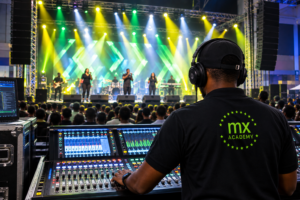
LIVE SOUND ENGINEERING TRAINING
Go beyond simply operating a mixer. Learn how to design, set up, manage and troubleshoot complete live sound systems.
What You Will Learn
- Sound fundamentals and signal flow
- Microphones, DI boxes, cables, and connectors
- Analog and digital mixing consoles
- Front-of-house and monitor mixing
- PA system setup and speaker placement
- Gain structure, EQ, compression, and effects
- Soundcheck procedures
- Feedback control and troubleshooting
- Stage Design and Stage management
- Live event production
- Safety and professional workflow
Why Train at MX Academy? - Practical, hands-on training
- Learn from experienced instructors
- Build confidence in real event situations
- Develop skills for concerts, studios, churches, events, and production companies
- Internationally recognized certifications.Whether you are a beginner, musician, church sound operator, aspiring audio engineer,
or event professional, this training will help you take your skills to the next level.Start your journey in live sound engineering today!
Delivery Format: Physical Class and Online Class
Duration: 8 Weeks
Registration: www.mxacademy.ng/register
Physical Class Location: Calabar, Cross River State
Contact: +234-8123 011 179.
Fee:
Seven Hundred Thousand Naira. [1,400 USD].
Accommodation: Available.
Advanced Audio Engineering Course [6 Weeks]
Module 1: Introduction to Audio & Sound Engineering (Week 1)
- Fundamentals of Sound
- Sound Waves: Frequency, Amplitude, and Wavelength
- Understanding Audio Signals
- Introduction to Sound Engineering
- Roles of a Sound Engineer
- Overview of Studio Equipment
- Overview of Digital Audio Workstations (DAWs)
Module 2: Advanced Audio Engineering Works
- Understanding the Four Factors that determines the quality of any audio sound
- Deciphering Sound Waves
- How to identify and modify audio frequencies.
- How to achieve vocal softening by modifying the audio frequencies.
- How to mix any sound by altering the audio frequencies
- How to compress and limits sounds manually without using plugins
- How to change the keys of an audio signal without using auto tune or dedicated plugins.
Module 3: Mixing Instrumentals
- Mixing percussion sounds
- Mixing kick drum sounds
- Mixing virtual instruments soundsWorking with Synthesizers
- How to synthesize sounds
- How to modify audio samples in your DAW
- Balancing Levels and Frequencies
- Working with EQs
- Adding Effects: Reverb, Delay, Compression, e.t.c
- Automation : How to automate your mixes
- Mastering instrumentals
Module 4: Setting Up and Recording a Multi-Track Session
- Multi-Track Recording Basics
Understanding Tracks and Channels - Connecting Equipment
Mixers, Microphones, Instruments, and Audio Interfaces - Setting Up for Optimal Sound Capture How to digitally pre-mix vocals before recording.
Module 5: Recording, Mixing, and Mastering
- Recording Techniques
- Capturing Clean Audio
- Overdubbing and Layering
- Mixing Tracks
- Equalization (EQ) and Panning
- Dynamic Processing: Compressors, Limiters
- Mastering Basics
- Preparing for Distribution
- Volume Normalization and Polishing
Module 6: Saving and Exporting Your Work
- Exporting in Different Formats
- Preparing Tracks for Streaming and Distribution
- Meta Tags:
- Embedding additional information to your audio file.
- How to embed album art to an audio file.
- How to embed artist, composer and producer details to an audio file.TUITION FEE:
One Thousand US Dollars (1,200 USD)
Six Hundred Thousand Naira (N600,000).DURATION: 6 Weeks (Weekdays: Mondays – Thursdays 10am – 4pm)
Online Classes: Available for this course
Serviced Accommodation Fee: N50,000 (100 USD) per month
Internship (Optional): Up to 3 Weeks
Live Sound Engineering [8 Weeks]
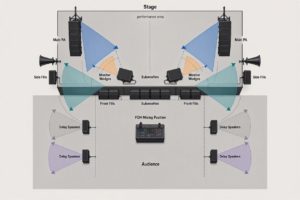
Live Music Production/Live Sound Engineering Training & Certification
What You Will Learn
- Sound fundamentals and signal flow
- Microphones, DI boxes, cables, and connectors
- Analog and digital mixing consoles
- Front-of-house and monitor mixing
- PA system setup and speaker placement
- Gain structure, EQ, compression, and effects
- Soundcheck procedures
- Feedback control and troubleshooting
- Stage Design and Stage management
- Live event production
- Safety and professional workflowWhy Train at MX Academy?
- Practical, hands-on training
- Learn from experienced instructors
- Build confidence in real event situations
- Develop skills for concerts, studios, churches, events, and production companies
- Internationally recognized certifications.Whether you are a beginner, musician, church sound operator, aspiring audio engineer,
or event professional, this training will help you take your skills to the next level.
Start your journey in live sound engineering today!
Delivery Format: Physical Class and Online Class
Duration: 8 Weeks
Registration: www.mxacademy.ng/register
Physical Class Location: Calabar, Cross River State
Contact: +234-8123 011 179.
www.mxacademy.ng
MX Academy — Learn the Sound. Control the Experience.
Click here to Register Now!
Music Business/Digital Music Distribution
DIGITAL MUSIC DISTRIBUTION
Professional Certificate Course
Course Focus: Music Distribution, Copyright, Royalties, Revenue Management & Digital Music Business
Course Duration: 8 Weeks
COURSE OBJECTIVE
This course equips students with the knowledge and practical skills required to professionally distribute music across digital platforms, protect intellectual property, manage ownership and revenue splits, collect royalties, monitor releases, and build sustainable digital income from music.
MODULE 1 — INTRODUCTION TO DIGITAL MUSIC DISTRIBUTION
- What is digital music distribution?
- How the modern digital music ecosystem works
- Record labels, artists, producers, publishers and distributors
- Digital Service Providers (DSPs)
- Streaming vs digital downloads
- Major streaming and music platforms
- Understanding the journey of a song from creation to listener
- Role of a digital music distributor
- Independent distribution vs record-label distribution
- Choosing the right distribution strategy
MODULE 2 — MUSIC RIGHTS & INTELLECTUAL PROPERTY
- Understanding intellectual property in music
- Copyright fundamentals
- Master Recording Rights
- Composition/Songwriting Rights
- Publishing Rights
- Performance Rights
- Mechanical Rights
- Neighbouring/Related Rights
- Moral rights
- Who owns what in a recording?
- Copyright ownership between artists, producers and songwriters
- Work-for-hire and commissioned productions
- Copyright registration and documentation
- Protecting music from unauthorized use
MODULE 3 — SONG OWNERSHIP & MUSIC CREDITS
- Artist credits
- Songwriter credits
- Producer credits
- Featured artist credits
- Mixing and mastering credits
- Label credits
- Publisher information
- Understanding metadata ownership
- Splits between collaborators
- Importance of documenting ownership before release
- Avoiding ownership disputes
MODULE 4 — REVENUE SPLITS & COLLABORATION AGREEMENTS
- Understanding music revenue
- Revenue sharing between collaborators
- Artist/producer splits
- Songwriter splits
- Label/artist arrangements
- Producer points and royalties
- Featured artist agreements
- Publishing splits
- Master recording revenue splits
- Creating a split sheet
- Agreeing on percentages before release
- Written agreements and digital documentation
- Common mistakes that cause royalty disputes
Practical Exercise
Students create a professional music split sheet for a collaborative recording.
MODULE 5 — MUSIC METADATA & RELEASE INFORMATION
- What is music metadata?
- ISRC — International Standard Recording Code
- UPC/EAN/barcodes
- ISWC and composition identification
- Artist name and release information
- Track titles
- Album/EP/single information
- Genre and subgenre
- Language
- Explicit-content labeling
- Release date
- Copyright information
- Composer and songwriter information
- Publisher information
- Metadata accuracy and why it matters
MODULE 6 — PREPARING MUSIC FOR DISTRIBUTION
- Audio quality requirements
- WAV and other delivery formats
- Artwork specifications
- Album and single artwork
- Artist profile information
- Clean and explicit versions
- Instrumentals and alternate versions
- Naming conventions
- Release documentation
- Pre-release quality control
- Common reasons releases are rejected
MODULE 7 — CHOOSING A DIGITAL DISTRIBUTOR
- What music distributors do
- Comparing distribution models
- Free vs paid distribution
- Commission-based distribution
- Subscription-based distribution
- Label distribution
- Distribution contracts
- Understanding distributor terms and conditions
- Ownership and licensing considerations
- Royalty collection
- Content ID and monetization
- Choosing a distributor for an independent artist
- Distributor red flags to watch for
Practical Exercise
Students compare different distribution models and develop a distribution strategy for an independent artist.
MODULE 8 — DISTRIBUTING MUSIC TO DIGITAL PLATFORMS
- Creating a distributor account
- Setting up an artist profile
- Creating a release
- Uploading audio
- Uploading artwork
- Entering metadata
- Adding contributors
- Setting release dates
- Selecting territories
- Selecting platforms
- Pre-save and pre-release strategies
- Submitting releases
- Release approval process
- Managing rejected releases
- Updating an existing release
MODULE 9 — ROYALTIES & MUSIC REVENUE
- How musicians make money from digital music
- Streaming royalties
- Download revenue
- Mechanical royalties
- Performance royalties
- Neighbouring rights
- Publishing royalties
- Master recording royalties
- YouTube revenue
- Content ID revenue
- Social media music monetization
- Sync licensing opportunities
- Understanding gross vs net revenue
- Distributor fees and deductions
MODULE 10 — ROYALTY COLLECTION & RIGHTS ORGANIZATIONS
- Understanding Performing Rights Organizations (PROs)
- Collective Management Organizations (CMOs)
- Mechanical rights organizations
- Neighbouring rights organizations
- Publishing administrators
- Registering works for royalty collection
- Matching recordings to compositions
- Avoiding uncollected royalties
- International royalty collection
- Understanding cross-border music revenue
MODULE 11 — REVENUE SPLITTING & ROYALTY PAYMENTS
- Setting up royalty splits
- Distributor royalty splitting
- Label royalty accounting
- Collaborator payments
- Producer royalty payments
- Publishing payments
- Recoupment
- Advances and deductions
- Payment schedules
- Statements and accounting
- Handling disputed payments
- Maintaining payment records
Practical Exercise
Students create a royalty allocation sheet showing how income from a release is distributed among multiple rights holders.
MODULE 12 — REVENUE TRACKING & MUSIC ACCOUNTING
- Tracking revenue across platforms
- Understanding royalty statements
- Reading distributor reports
- Streaming reports
- Download reports
- Territory-by-territory revenue
- Platform-by-platform revenue
- Monthly and annual revenue reporting
- Tracking collaborators’ shares
- Currency conversion
- Payment reconciliation
- Identifying missing or delayed royalties
- Creating a music revenue spreadsheet/dashboard
- Maintaining financial records for a music catalog
Practical Exercise
Students analyze a sample royalty statement and prepare a revenue report.
MODULE 13 — STREAMING DATA & ANALYTICS
- Understanding streaming statistics
- Streams vs listeners
- Monthly listeners
- Audience demographics
- Geographic data
- Playlist performance
- Source of streams
- Release performance
- Audience retention
- Identifying successful songs
- Using analytics to plan future releases
- Detecting unusual streaming activity
- Using data to support marketing decisions
MODULE 14 — YOUTUBE, CONTENT ID & SOCIAL MEDIA MONETIZATION
- YouTube music ecosystem
- Official Artist Channels
- YouTube Music
- Content ID
- Monetizing unauthorized uses of music
- User-generated content
- Facebook/Instagram music ecosystem
- TikTok music ecosystem
- Short-form video and music discovery
- Claiming and managing music usage
- Copyright claims vs copyright strikes
- Rights management across social platforms
MODULE 15 — COPYRIGHT ENFORCEMENT & MUSIC PROTECTION
- Detecting unauthorized use of music
- Copyright infringement
- Takedown procedures
- Copyright claims
- Dispute procedures
- Content ID claims
- Unauthorized uploads
- Sampling and interpolation issues
- Cover songs and licensing
- Remix permissions
- Protecting music internationally
- Maintaining evidence of ownership
MODULE 16 — MUSIC RELEASE STRATEGY
- Singles vs EPs vs albums
- Release scheduling
- Pre-release planning
- Pre-save campaigns
- Playlist pitching
- Digital marketing
- Social media promotion
- Building release campaigns
- Coordinating music distribution with promotion
- Release-day strategy
- Post-release promotion
- Catalog management
- Releasing consistently
MODULE 17 — MUSIC CATALOG MANAGEMENT
- Managing multiple releases
- Organizing master recordings
- Maintaining metadata databases
- Tracking ISRCs and UPCs
- Managing ownership information
- Managing contracts and split sheets
- Tracking royalty income
- Catalog valuation
- Licensing opportunities
- Backup and archival systems
- Long-term digital asset management
MODULE 18 — MUSIC BUSINESS LEGAL & CONTRACT BASICS
- Artist agreements
- Producer agreements
- Collaboration agreements
- Label agreements
- Distribution agreements
- Licensing agreements
- Publishing agreements
- Synchronization agreements
- Exclusive vs non-exclusive agreements
- Understanding licensing periods
- Territory restrictions
- Termination clauses
- Reading contracts before signing
- When to seek professional legal advice
EXPECTED OUTCOMES
At the end of the course, students should be able to:
- Professionally prepare music for digital distribution
- Understand and manage music copyrights
- Identify different types of music rights
- Prepare accurate music metadata
- Create professional split sheets
- Understand streaming and digital royalties
- Set up and manage digital releases
- Select appropriate distribution platforms
- Track music revenue and royalties
- Understand royalty statements
- Manage revenue splits between collaborators
- Monitor streaming and audience analytics
- Protect music against unauthorized use
- Manage an artist’s digital music catalog
- Develop professional release strategies
- Build systems for long-term music revenue management
CERTIFICATION
MX Academy Professional Certificate in Music Business/Digital Music Distribution
Live Event Video Production & Broadcasting
LIVE EVENT VIDEO PRODUCTION & BROADCASTING
Professional Certificate Course
Course Duration: 8 Weeks
Format: Demonstrations, Guided Practice, Rehearsals & Final Live-Event Production
COURSE GOAL
Students will develop the practical skills required to plan, operate and manage video, presentation visuals, venue displays and online broadcasting for live events.
MODULE 1 —
INTRODUCTION TO LIVE EVENT VIDEO PRODUCTION
- Understanding live event video production
- In-room visual presentation vs online broadcasting
- Types of live events and production requirements
- Basic live production workflow
- Production crew roles and responsibilities
- Understanding the video signal path
- Camera, video, audio and display workflow
- Introduction to live production terminology
- Venue-based production vs studio production
Practical Exercise
Trace the complete signal path from camera and microphone through the mixer, production computer, venue display, streaming platform and audience.
MODULE 2 — CAMERAS, VIDEO, AUDIO & EQUIPMENT BASICS
- Types of cameras used for live production
- Camera inputs and outputs
- Basic camera operation
- Video resolutions and aspect ratios
- Frame rates and video formats
- Video capture devices
- Computers for live production
- Projectors, LED screens and displays
- Microphones and basic audio connections
- HDMI, SDI, USB and other common connections
- Basic audio monitoring
- Understanding video and audio latency
Practical Exercise
Connect a camera and laptop to a display, configure the inputs and verify picture and sound.
MODULE 3 — PRODUCING LIVE EVENT VISUALS
- Understanding presentation software for live events
- Creating event presentations
- Preparing Bible verses and lyrics
- Displaying announcements and information
- Adding images and videos
- Managing presentation content
- Organizing content for live operation
- Audience screen vs operator screen
- Managing presentation cues
- Switching between different visual elements
- Preparing holding screens and event graphics
Practical Exercise
Build and operate a short event/service presentation containing lyrics, announcements, images and video.
MODULE 4 — INTRODUCTION TO LIVE BROADCASTING
- Understanding live streaming and broadcasting
- Live broadcast workflow
- Camera-to-stream signal path
- Audio-to-stream signal path
- Streaming computers and capture devices
- Streaming platforms
- Basic broadcast terminology
- Roles of a live broadcast crew
- Program feed and audience feed
- Internet requirements for live broadcasting
- Basic streaming quality considerations
Practical Exercise
Map and configure the signal flow for a simple live broadcast.
MODULE 5 — OBS STUDIO FUNDAMENTALS
- Introduction to OBS Studio
- Understanding the OBS interface
- Scenes and sources
- Adding cameras to OBS
- Adding media files
- Screen capture
- Window capture
- Adding presentation software
- Titles and text overlays
- Logos and branding
- Audio sources
- Scene transitions
- Switching between scenes
- Recording a production
- Basic streaming configuration
Practical Exercise
Build OBS scenes for a speaker, presentation slides, video content and holding screen.
MODULE 6 — COMPLEX PRODUCTION WORKFLOWS & NETWORKING
- Multi-computer live production workflows
- Connecting multiple production computers
- Sharing visual content across computers
- Introduction to NDI
- NDI over a local network
- Sending presentation visuals to OBS
- Sending video sources between computers
- Network configuration for live production
- Managing multiple visual sources
- Synchronizing presentation and broadcast workflows
- Troubleshooting network-based video sources
Practical Exercise
Connect multiple computers on a local network and send presentation visuals from one computer into OBS on another computer.
MODULE 7 — PROJECTING VISUALS TO THE VENUE
- Venue projection systems
- LED walls and large-format displays
- Confidence monitors
- Main screen vs confidence screen
- Video output configuration
- Screen resolution and aspect ratio
- Extended displays
- Duplicate vs extended desktop
- Display positioning
- Screen readability
- Managing different content for different displays
- Troubleshooting display and projection problems
Practical Exercise
Route presentation slides and camera video to a venue display while maintaining a separate operator/production screen.
MODULE 8 — LIVE BROADCASTING, SCREEN LAYOUT & PRODUCTION CONTROL
- Configuring a complete livestream
- Broadcast scene design
- Full-screen camera views
- Presentation and camera combinations
- Split-screen layouts
- Picture-in-picture
- Lower thirds and speaker identification
- Logos and broadcast branding
- Multiple camera switching
- Audio monitoring during broadcast
- Managing live cues
- Recording the broadcast
- Monitoring stream performance
Practical Exercise
Build and operate a multi-source broadcast featuring camera views, presentation slides, speaker information and split-screen layouts.
MODULE 9 — REHEARSAL, TROUBLESHOOTING & LIVE PRODUCTION MANAGEMENT
- Planning a live production
- Creating production checklists
- Pre-event equipment checks
- Camera and audio checks
- Display and projection checks
- Internet and network checks
- Rehearsing production cues
- Coordinating production crew
- Managing unexpected technical problems
- Troubleshooting video sources
- Troubleshooting audio problems
- Troubleshooting display problems
- Troubleshooting network and streaming problems
- Backup plans and redundancy
- Staying operational during live events
Practical Exercise
Conduct a complete technical rehearsal with planned equipment and workflow problems for students to diagnose and resolve.
MODULE 10 — FINAL LIVE EVENT PRODUCTION PROJECT
Students will plan, set up and operate a complete live event video production and online broadcast.
Project Requirements
- Event production planning
- Equipment preparation
- Camera setup
- Audio integration
- Presentation preparation
- Venue display setup
- OBS production setup
- Network configuration
- Broadcast scene creation
- Live camera switching
- Presentation and visual management
- Split-screen production
- Online streaming
- Production monitoring
- Post-event recording and review
Final Practical Project
Students will work individually or as a production team to produce and broadcast a complete live event, from setup and rehearsal through the live production and online transmission.
EXPECTED LEARNING OUTCOMES
At the end of the course, students should be able to:
- Set up video systems for live events
- Operate cameras and video sources
- Manage presentations and event visuals
- Configure projectors, LED screens and confidence monitors
- Build OBS Studio productions
- Connect multiple computers for live production
- Use NDI for network-based video workflows
- Produce split-screen and multi-source broadcasts
- Integrate audio and video into a livestream
- Operate a live broadcast independently or as part of a production team
- Troubleshoot common live production problems
- Plan, rehearse and execute a complete live event broadcast
CERTIFICATION
MX Academy Professional Certificate in Live Event Video Production & Broadcasting
Course Duration: 8 Weeks
Tuition Fee: N800,000.