Click on any of the course titles below to reveal full details.
Diploma in Video Production [6 Weeks ]
This course is for aspiring filmmakers/multimedia proffessionals. No prior multimedia knowledge is required for this course. You will be taught everything from the scratch.
Requirements A laptop computer that meets the requirements on our requirements page. Ability to take lessons in English language
Course Contents
SESSION 1: PHOTOGRAPHY & CINEMATOGRAPHY
- Digital Photography
- Cinematography & Advance Camera techniques with sliders, dollies and multi-axis electronic camera stabilisers
SESSION 2: DIRECTING & LIGHTING
- Directing for movies
- Directing for music videos,
- Directing for documentaries
- Lighting
SESSION 3: POST PRODUCTION
- Video Editing
- Colour Grading
- Motion Graphics Animation
- Preparing videos for online Streaming and playback on different devices
TUITION FEE:
One Thousand US Dollars (1,000 USD)
Six Hundred Thousand Naira (N600,000).
DURATION: 6 Weeks
(Weekdays: Mondays – Thursdays 10am – 4pm)
Online Classes: Available for this course
Serviced Accommodation Fee: N50,000 (100 USD) per month
Payment Plans: Three installments accepted
Internship (Optional): Up to 3 Weeks
Register For This Course Now >>
Diploma in Advance Film Making With Drone Piloting [3 Months ]
This course is for aspiring filmmakers/multimedia proffessionals. No prior multimedia knowledge is required for this course. You will be taught everything from the scratch.
Requirements A laptop computer that meets the requirements on our requirements page. Ability to take lessons in English language
Course Contents
SESSION 1: PHOTOGRAPHY & CINEMATOGRAPHY
- Digital Photography
- Cinematography & Advance Camera techniques with sliders, dollies and multi-axis electronic camera stabilisers
SESSION 2: DIRECTING & LIGHTING
- Directing for movies
- Directing for music videos,
- Directing for documentaries
- Lighting
SESSION 3: SCRIPT WRITING
- How to write a movie script
- How to write a music video script
- How to write an advert video script
- How to write a documentary video script
SESSION 4: POST PRODUCTION
- Video Editing
- Colour Grading
- Motion Graphics Animation
- Preparing videos for online Streaming and playback on different devices
- SESSION 5: DRONE PILOTING
- Safety regulations for drones and remotely controlled aircrafts (RPAs)
- Pre – flight preparations
- Flight simulation for multicopters
- Drone Set up and GPS Calibration
- Flight Techniques
- Pairing and controlling the aircraft with a mobile device
- Emergency landing techniques
- Directing and shooting cinematic aerial shots – practice
TUITION FEE:
Two Thousand US Dollars (2,000 USD) One Million Five Hundred Thousand Naira (N1,200,000).
DURATION: 3 Months
(Weekdays: Mondays – Thursdays 10am – 4pm)
(Weekend Classes: Not Available for this course)
(Online Classes: Not Available for this course)
Serviced Accommodation Fee: N50,000 (100 USD) per month
Payment Plans: Three installments accepted
Internship (Optional): Up to 3 Months
Register For This Course Now >>
Diploma in Advance Film Making With Motion Graphics Animation & Drone Piloting [3 Months]
This certification program is intended for those with a passion for film-making, music video production, documentary and TV production.
It covers a wide range of topics under the following courses;
Course Contents
1. Digital Photography
2. Cinematography/Advance Camera Techniques
3. Directing for Film & Documentaries
4. Directing for Music Videos
5. Motion Graphics Animation
6. Video Editing.
7. Drone Piloting
DURATION:
Training Duration: 3 Months
FEE: 2,000 US Dollars.
N1,500,000
Professional Diploma in Video Production, Animation, Drone/UAV Piloting & A.I. [6 Months]
This course is for aspiring filmmakers/multimedia proffessionals. No prior multimedia knowledge is required for this course. You will taught everything from the scratch.
Requirements
A laptop computer that meets the requirements on our requirements page.
Ability to take lessons in English language
Course Contents
SESSION 1 : PHOTOGRAPHY & CINEMATOGRAPHY
1. Digital Photography
2. Cinematography & Advance Camera techniques with sliders, dollies and multi-axis electronic camera stabilisers.
SESSION 2: DIRECTING & LIGHTING
- Directing for movies
- Directing for music videos,
- Directing for documentaries
- Lighting
SESSION 3 : POST PRODUCTION
- Video Editing
- Colour Grading
- Motion Graphics Animation
- Preparing videos for online Streaming and playback on different devices
SESSION 4 : ADVANCE CINEMATICS
1. Thinking in Graphics (Advance Graphics & Branding Class) – theory & practice
2. Advance Colour Correction – Practice
3. Advance Camera Settings & Operations – practice
4. Setting up and balancing motorized multi-axis camera stabilizers – practice
5. Advance Cinematic Shots – Practice
6. Directing multi camera scenes for TVs, movies and reality shows – practice
7. Directing music video scenes – practice
8. Music Video tips & tricks (concepts, camera movements and editing styles)
9. Directing Visual Effects scenes for music videos – practice
10. Camera Tracking (Visual Effects) – Practice
11. Computer Generated Visual Effects Development – practice
12. Advance Digital Video Editing – Practice
13. Encoding videos to different formats for use on various devices – practice
SESSION 5 : 2D GRAPHICS ANIMATION
- Creating and organizing your animation assets
- Creating graphics animations
- Adding voice over and background sounds to your graphics animation
- Encoding animation videos to different formats for use on various devices.
SESSION 6 : MEDIA CREATION WITH A.I.
- Creating Scenes with A.I.
- Creating Characters With A.I.
- Creating voice over audio narrations with A.I.
SESSION 7 : DRONE PILOTING
1. Safety regulations for drones and remotely controlled aircrafts (RPAs)
2. Pre – flight preparations
3. Flight simulation for multicopters
4. Drone Set up and GPS Calibration
5. Flight Techniques
6. Pairing and controlling the aircraft with a mobile device
7. Emergency landing techniques
8. Directing and shooting cinematic aerial shots – practice
TUITION FEE:
Three Thousand Eight Hundred US Dollars (3,800 USD)
Two Million Six Hundred Thousand Naira (N2,200,000).
DURATION: 6 Months
Weekdays: Mondays – Thursdays 10am – 4pm
Online Classes: Not Available for this course
Serviced Accommodation Fee: N50,000 (100 USD) per month
Payment Plans: Three installments accepted
Internship (Optional): Up to 3 Months
Next Session Start Date: January 19, 2026.
Music Production & Sound Engineering [8 Weeks]
Become a certified Music Producer & Sound Engineer, join the MX Film & Multimedia Academy’s 4 Weeks Intensive Practical Music Production & Sound Engineering Training Boot Camp
Starting April 2023. This certification program is intended for those with a passion for music production. You will be taught how to create instrumentals, record audio, mix and master audio professionally.
Course Contents
- Introduction to Music production & Sound Engineering
- Creating Instrumentals from Scratch
- Arranging instrumentals
- Mixing and finalizing instrumentals
- Setting up up multi-track recording session
- Connecting mixers, microphones, guitars, workstations and other audio inputs
- Recording multi-track session audio
- Mixing
- 9.Mastering
- Saving and exporting your files to different formats.
Fee: N600,000
Duration: 8 Weeks
Diploma in Live Sound Engineering [8 Weeks]
BEHIND EVERY GREAT LIVE EVENT IS A GREAT SOUND ENGINEER.
The audience sees the performers.
The sound engineer controls what they hear.
Learn the technology, techniques and workflow behind professional live sound production at MX Academy.
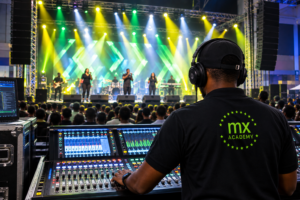
LIVE SOUND ENGINEERING TRAINING
Go beyond simply operating a mixer. Learn how to design, set up, manage and troubleshoot complete live sound systems.
What You Will Learn
- Sound fundamentals and signal flow
- Microphones, DI boxes, cables, and connectors
- Analog and digital mixing consoles
- Front-of-house and monitor mixing
- PA system setup and speaker placement
- Gain structure, EQ, compression, and effects
- Soundcheck procedures
- Feedback control and troubleshooting
- Stage Design and Stage management
- Live event production
- Safety and professional workflow
Why Train at MX Academy? - Practical, hands-on training
- Learn from experienced instructors
- Build confidence in real event situations
- Develop skills for concerts, studios, churches, events, and production companies
- Internationally recognized certifications.Whether you are a beginner, musician, church sound operator, aspiring audio engineer,
or event professional, this training will help you take your skills to the next level.Start your journey in live sound engineering today!
Delivery Format: Physical Class and Online Class
Duration: 8 Weeks
Registration: www.mxacademy.ng/register
Physical Class Location: Calabar, Cross River State
Contact: +234-8123 011 179.
Fee:
Seven Hundred Thousand Naira. [1,400 USD].
Accommodation: Available.
Advanced Audio Engineering Course [6 Weeks]
Module 1: Introduction to Audio & Sound Engineering (Week 1)
- Fundamentals of Sound
- Sound Waves: Frequency, Amplitude, and Wavelength
- Understanding Audio Signals
- Introduction to Sound Engineering
- Roles of a Sound Engineer
- Overview of Studio Equipment
- Overview of Digital Audio Workstations (DAWs)
Module 2: Advanced Audio Engineering Works
- Understanding the Four Factors that determines the quality of any audio sound
- Deciphering Sound Waves
- How to identify and modify audio frequencies.
- How to achieve vocal softening by modifying the audio frequencies.
- How to mix any sound by altering the audio frequencies
- How to compress and limits sounds manually without using plugins
- How to change the keys of an audio signal without using auto tune or dedicated plugins.
Module 3: Mixing Instrumentals
- Mixing percussion sounds
- Mixing kick drum sounds
- Mixing virtual instruments soundsWorking with Synthesizers
- How to synthesize sounds
- How to modify audio samples in your DAW
- Balancing Levels and Frequencies
- Working with EQs
- Adding Effects: Reverb, Delay, Compression, e.t.c
- Automation : How to automate your mixes
- Mastering instrumentals
Module 4: Setting Up and Recording a Multi-Track Session
- Multi-Track Recording Basics
Understanding Tracks and Channels - Connecting Equipment
Mixers, Microphones, Instruments, and Audio Interfaces - Setting Up for Optimal Sound Capture How to digitally pre-mix vocals before recording.
Module 5: Recording, Mixing, and Mastering
- Recording Techniques
- Capturing Clean Audio
- Overdubbing and Layering
- Mixing Tracks
- Equalization (EQ) and Panning
- Dynamic Processing: Compressors, Limiters
- Mastering Basics
- Preparing for Distribution
- Volume Normalization and Polishing
Module 6: Saving and Exporting Your Work
- Exporting in Different Formats
- Preparing Tracks for Streaming and Distribution
- Meta Tags:
- Embedding additional information to your audio file.
- How to embed album art to an audio file.
- How to embed artist, composer and producer details to an audio file.TUITION FEE:
One Thousand US Dollars (1,200 USD)
Six Hundred Thousand Naira (N600,000).DURATION: 6 Weeks (Weekdays: Mondays – Thursdays 10am – 4pm)
Online Classes: Available for this course
Serviced Accommodation Fee: N50,000 (100 USD) per month
Internship (Optional): Up to 3 Weeks
Live Sound Engineering [8 Weeks]
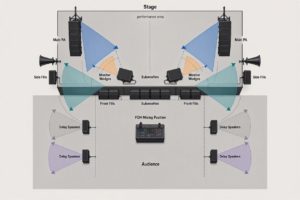
Live Music Production/Live Sound Engineering Training & Certification
What You Will Learn
- Sound fundamentals and signal flow
- Microphones, DI boxes, cables, and connectors
- Analog and digital mixing consoles
- Front-of-house and monitor mixing
- PA system setup and speaker placement
- Gain structure, EQ, compression, and effects
- Soundcheck procedures
- Feedback control and troubleshooting
- Stage Design and Stage management
- Live event production
- Safety and professional workflowWhy Train at MX Academy?
- Practical, hands-on training
- Learn from experienced instructors
- Build confidence in real event situations
- Develop skills for concerts, studios, churches, events, and production companies
- Internationally recognized certifications.Whether you are a beginner, musician, church sound operator, aspiring audio engineer,
or event professional, this training will help you take your skills to the next level.
Start your journey in live sound engineering today!
Delivery Format: Physical Class and Online Class
Duration: 8 Weeks
Registration: www.mxacademy.ng/register
Physical Class Location: Calabar, Cross River State
Contact: +234-8123 011 179.
www.mxacademy.ng
MX Academy — Learn the Sound. Control the Experience.
Click here to Register Now!
Music Business/Digital Music Distribution
DIGITAL MUSIC DISTRIBUTION
Professional Certificate Course
Course Focus: Music Distribution, Copyright, Royalties, Revenue Management & Digital Music Business
Course Duration: 8 Weeks
COURSE OBJECTIVE
This course equips students with the knowledge and practical skills required to professionally distribute music across digital platforms, protect intellectual property, manage ownership and revenue splits, collect royalties, monitor releases, and build sustainable digital income from music.
MODULE 1 — INTRODUCTION TO DIGITAL MUSIC DISTRIBUTION
- What is digital music distribution?
- How the modern digital music ecosystem works
- Record labels, artists, producers, publishers and distributors
- Digital Service Providers (DSPs)
- Streaming vs digital downloads
- Major streaming and music platforms
- Understanding the journey of a song from creation to listener
- Role of a digital music distributor
- Independent distribution vs record-label distribution
- Choosing the right distribution strategy
MODULE 2 — MUSIC RIGHTS & INTELLECTUAL PROPERTY
- Understanding intellectual property in music
- Copyright fundamentals
- Master Recording Rights
- Composition/Songwriting Rights
- Publishing Rights
- Performance Rights
- Mechanical Rights
- Neighbouring/Related Rights
- Moral rights
- Who owns what in a recording?
- Copyright ownership between artists, producers and songwriters
- Work-for-hire and commissioned productions
- Copyright registration and documentation
- Protecting music from unauthorized use
MODULE 3 — SONG OWNERSHIP & MUSIC CREDITS
- Artist credits
- Songwriter credits
- Producer credits
- Featured artist credits
- Mixing and mastering credits
- Label credits
- Publisher information
- Understanding metadata ownership
- Splits between collaborators
- Importance of documenting ownership before release
- Avoiding ownership disputes
MODULE 4 — REVENUE SPLITS & COLLABORATION AGREEMENTS
- Understanding music revenue
- Revenue sharing between collaborators
- Artist/producer splits
- Songwriter splits
- Label/artist arrangements
- Producer points and royalties
- Featured artist agreements
- Publishing splits
- Master recording revenue splits
- Creating a split sheet
- Agreeing on percentages before release
- Written agreements and digital documentation
- Common mistakes that cause royalty disputes
Practical Exercise
Students create a professional music split sheet for a collaborative recording.
MODULE 5 — MUSIC METADATA & RELEASE INFORMATION
- What is music metadata?
- ISRC — International Standard Recording Code
- UPC/EAN/barcodes
- ISWC and composition identification
- Artist name and release information
- Track titles
- Album/EP/single information
- Genre and subgenre
- Language
- Explicit-content labeling
- Release date
- Copyright information
- Composer and songwriter information
- Publisher information
- Metadata accuracy and why it matters
MODULE 6 — PREPARING MUSIC FOR DISTRIBUTION
- Audio quality requirements
- WAV and other delivery formats
- Artwork specifications
- Album and single artwork
- Artist profile information
- Clean and explicit versions
- Instrumentals and alternate versions
- Naming conventions
- Release documentation
- Pre-release quality control
- Common reasons releases are rejected
MODULE 7 — CHOOSING A DIGITAL DISTRIBUTOR
- What music distributors do
- Comparing distribution models
- Free vs paid distribution
- Commission-based distribution
- Subscription-based distribution
- Label distribution
- Distribution contracts
- Understanding distributor terms and conditions
- Ownership and licensing considerations
- Royalty collection
- Content ID and monetization
- Choosing a distributor for an independent artist
- Distributor red flags to watch for
Practical Exercise
Students compare different distribution models and develop a distribution strategy for an independent artist.
MODULE 8 — DISTRIBUTING MUSIC TO DIGITAL PLATFORMS
- Creating a distributor account
- Setting up an artist profile
- Creating a release
- Uploading audio
- Uploading artwork
- Entering metadata
- Adding contributors
- Setting release dates
- Selecting territories
- Selecting platforms
- Pre-save and pre-release strategies
- Submitting releases
- Release approval process
- Managing rejected releases
- Updating an existing release
MODULE 9 — ROYALTIES & MUSIC REVENUE
- How musicians make money from digital music
- Streaming royalties
- Download revenue
- Mechanical royalties
- Performance royalties
- Neighbouring rights
- Publishing royalties
- Master recording royalties
- YouTube revenue
- Content ID revenue
- Social media music monetization
- Sync licensing opportunities
- Understanding gross vs net revenue
- Distributor fees and deductions
MODULE 10 — ROYALTY COLLECTION & RIGHTS ORGANIZATIONS
- Understanding Performing Rights Organizations (PROs)
- Collective Management Organizations (CMOs)
- Mechanical rights organizations
- Neighbouring rights organizations
- Publishing administrators
- Registering works for royalty collection
- Matching recordings to compositions
- Avoiding uncollected royalties
- International royalty collection
- Understanding cross-border music revenue
MODULE 11 — REVENUE SPLITTING & ROYALTY PAYMENTS
- Setting up royalty splits
- Distributor royalty splitting
- Label royalty accounting
- Collaborator payments
- Producer royalty payments
- Publishing payments
- Recoupment
- Advances and deductions
- Payment schedules
- Statements and accounting
- Handling disputed payments
- Maintaining payment records
Practical Exercise
Students create a royalty allocation sheet showing how income from a release is distributed among multiple rights holders.
MODULE 12 — REVENUE TRACKING & MUSIC ACCOUNTING
- Tracking revenue across platforms
- Understanding royalty statements
- Reading distributor reports
- Streaming reports
- Download reports
- Territory-by-territory revenue
- Platform-by-platform revenue
- Monthly and annual revenue reporting
- Tracking collaborators' shares
- Currency conversion
- Payment reconciliation
- Identifying missing or delayed royalties
- Creating a music revenue spreadsheet/dashboard
- Maintaining financial records for a music catalog
Practical Exercise
Students analyze a sample royalty statement and prepare a revenue report.
MODULE 13 — STREAMING DATA & ANALYTICS
- Understanding streaming statistics
- Streams vs listeners
- Monthly listeners
- Audience demographics
- Geographic data
- Playlist performance
- Source of streams
- Release performance
- Audience retention
- Identifying successful songs
- Using analytics to plan future releases
- Detecting unusual streaming activity
- Using data to support marketing decisions
MODULE 14 — YOUTUBE, CONTENT ID & SOCIAL MEDIA MONETIZATION
- YouTube music ecosystem
- Official Artist Channels
- YouTube Music
- Content ID
- Monetizing unauthorized uses of music
- User-generated content
- Facebook/Instagram music ecosystem
- TikTok music ecosystem
- Short-form video and music discovery
- Claiming and managing music usage
- Copyright claims vs copyright strikes
- Rights management across social platforms
MODULE 15 — COPYRIGHT ENFORCEMENT & MUSIC PROTECTION
- Detecting unauthorized use of music
- Copyright infringement
- Takedown procedures
- Copyright claims
- Dispute procedures
- Content ID claims
- Unauthorized uploads
- Sampling and interpolation issues
- Cover songs and licensing
- Remix permissions
- Protecting music internationally
- Maintaining evidence of ownership
MODULE 16 — MUSIC RELEASE STRATEGY
- Singles vs EPs vs albums
- Release scheduling
- Pre-release planning
- Pre-save campaigns
- Playlist pitching
- Digital marketing
- Social media promotion
- Building release campaigns
- Coordinating music distribution with promotion
- Release-day strategy
- Post-release promotion
- Catalog management
- Releasing consistently
MODULE 17 — MUSIC CATALOG MANAGEMENT
- Managing multiple releases
- Organizing master recordings
- Maintaining metadata databases
- Tracking ISRCs and UPCs
- Managing ownership information
- Managing contracts and split sheets
- Tracking royalty income
- Catalog valuation
- Licensing opportunities
- Backup and archival systems
- Long-term digital asset management
MODULE 18 — MUSIC BUSINESS LEGAL & CONTRACT BASICS
- Artist agreements
- Producer agreements
- Collaboration agreements
- Label agreements
- Distribution agreements
- Licensing agreements
- Publishing agreements
- Synchronization agreements
- Exclusive vs non-exclusive agreements
- Understanding licensing periods
- Territory restrictions
- Termination clauses
- Reading contracts before signing
- When to seek professional legal advice
EXPECTED OUTCOMES
At the end of the course, students should be able to:
- Professionally prepare music for digital distribution
- Understand and manage music copyrights
- Identify different types of music rights
- Prepare accurate music metadata
- Create professional split sheets
- Understand streaming and digital royalties
- Set up and manage digital releases
- Select appropriate distribution platforms
- Track music revenue and royalties
- Understand royalty statements
- Manage revenue splits between collaborators
- Monitor streaming and audience analytics
- Protect music against unauthorized use
- Manage an artist's digital music catalog
- Develop professional release strategies
- Build systems for long-term music revenue management
CERTIFICATION
MX Academy Professional Certificate in Music Business/Digital Music Distribution
Live Event Video Production & Broadcasting
LIVE EVENT VIDEO PRODUCTION & BROADCASTING
Professional Certificate Course
Course Duration: 8 Weeks
Format: Demonstrations, Guided Practice, Rehearsals & Final Live-Event Production
COURSE GOAL
Students will develop the practical skills required to plan, operate and manage video, presentation visuals, venue displays and online broadcasting for live events.
MODULE 1 —
INTRODUCTION TO LIVE EVENT VIDEO PRODUCTION
- Understanding live event video production
- In-room visual presentation vs online broadcasting
- Types of live events and production requirements
- Basic live production workflow
- Production crew roles and responsibilities
- Understanding the video signal path
- Camera, video, audio and display workflow
- Introduction to live production terminology
- Venue-based production vs studio production
Practical Exercise
Trace the complete signal path from camera and microphone through the mixer, production computer, venue display, streaming platform and audience.
MODULE 2 — CAMERAS, VIDEO, AUDIO & EQUIPMENT BASICS
- Types of cameras used for live production
- Camera inputs and outputs
- Basic camera operation
- Video resolutions and aspect ratios
- Frame rates and video formats
- Video capture devices
- Computers for live production
- Projectors, LED screens and displays
- Microphones and basic audio connections
- HDMI, SDI, USB and other common connections
- Basic audio monitoring
- Understanding video and audio latency
Practical Exercise
Connect a camera and laptop to a display, configure the inputs and verify picture and sound.
MODULE 3 — PRODUCING LIVE EVENT VISUALS
- Understanding presentation software for live events
- Creating event presentations
- Preparing Bible verses and lyrics
- Displaying announcements and information
- Adding images and videos
- Managing presentation content
- Organizing content for live operation
- Audience screen vs operator screen
- Managing presentation cues
- Switching between different visual elements
- Preparing holding screens and event graphics
Practical Exercise
Build and operate a short event/service presentation containing lyrics, announcements, images and video.
MODULE 4 — INTRODUCTION TO LIVE BROADCASTING
- Understanding live streaming and broadcasting
- Live broadcast workflow
- Camera-to-stream signal path
- Audio-to-stream signal path
- Streaming computers and capture devices
- Streaming platforms
- Basic broadcast terminology
- Roles of a live broadcast crew
- Program feed and audience feed
- Internet requirements for live broadcasting
- Basic streaming quality considerations
Practical Exercise
Map and configure the signal flow for a simple live broadcast.
MODULE 5 — OBS STUDIO FUNDAMENTALS
- Introduction to OBS Studio
- Understanding the OBS interface
- Scenes and sources
- Adding cameras to OBS
- Adding media files
- Screen capture
- Window capture
- Adding presentation software
- Titles and text overlays
- Logos and branding
- Audio sources
- Scene transitions
- Switching between scenes
- Recording a production
- Basic streaming configuration
Practical Exercise
Build OBS scenes for a speaker, presentation slides, video content and holding screen.
MODULE 6 — COMPLEX PRODUCTION WORKFLOWS & NETWORKING
- Multi-computer live production workflows
- Connecting multiple production computers
- Sharing visual content across computers
- Introduction to NDI
- NDI over a local network
- Sending presentation visuals to OBS
- Sending video sources between computers
- Network configuration for live production
- Managing multiple visual sources
- Synchronizing presentation and broadcast workflows
- Troubleshooting network-based video sources
Practical Exercise
Connect multiple computers on a local network and send presentation visuals from one computer into OBS on another computer.
MODULE 7 — PROJECTING VISUALS TO THE VENUE
- Venue projection systems
- LED walls and large-format displays
- Confidence monitors
- Main screen vs confidence screen
- Video output configuration
- Screen resolution and aspect ratio
- Extended displays
- Duplicate vs extended desktop
- Display positioning
- Screen readability
- Managing different content for different displays
- Troubleshooting display and projection problems
Practical Exercise
Route presentation slides and camera video to a venue display while maintaining a separate operator/production screen.
MODULE 8 — LIVE BROADCASTING, SCREEN LAYOUT & PRODUCTION CONTROL
- Configuring a complete livestream
- Broadcast scene design
- Full-screen camera views
- Presentation and camera combinations
- Split-screen layouts
- Picture-in-picture
- Lower thirds and speaker identification
- Logos and broadcast branding
- Multiple camera switching
- Audio monitoring during broadcast
- Managing live cues
- Recording the broadcast
- Monitoring stream performance
Practical Exercise
Build and operate a multi-source broadcast featuring camera views, presentation slides, speaker information and split-screen layouts.
MODULE 9 — REHEARSAL, TROUBLESHOOTING & LIVE PRODUCTION MANAGEMENT
- Planning a live production
- Creating production checklists
- Pre-event equipment checks
- Camera and audio checks
- Display and projection checks
- Internet and network checks
- Rehearsing production cues
- Coordinating production crew
- Managing unexpected technical problems
- Troubleshooting video sources
- Troubleshooting audio problems
- Troubleshooting display problems
- Troubleshooting network and streaming problems
- Backup plans and redundancy
- Staying operational during live events
Practical Exercise
Conduct a complete technical rehearsal with planned equipment and workflow problems for students to diagnose and resolve.
MODULE 10 — FINAL LIVE EVENT PRODUCTION PROJECT
Students will plan, set up and operate a complete live event video production and online broadcast.
Project Requirements
- Event production planning
- Equipment preparation
- Camera setup
- Audio integration
- Presentation preparation
- Venue display setup
- OBS production setup
- Network configuration
- Broadcast scene creation
- Live camera switching
- Presentation and visual management
- Split-screen production
- Online streaming
- Production monitoring
- Post-event recording and review
Final Practical Project
Students will work individually or as a production team to produce and broadcast a complete live event, from setup and rehearsal through the live production and online transmission.
EXPECTED LEARNING OUTCOMES
At the end of the course, students should be able to:
- Set up video systems for live events
- Operate cameras and video sources
- Manage presentations and event visuals
- Configure projectors, LED screens and confidence monitors
- Build OBS Studio productions
- Connect multiple computers for live production
- Use NDI for network-based video workflows
- Produce split-screen and multi-source broadcasts
- Integrate audio and video into a livestream
- Operate a live broadcast independently or as part of a production team
- Troubleshoot common live production problems
- Plan, rehearse and execute a complete live event broadcast
CERTIFICATION
MX Academy Professional Certificate in Live Event Video Production & Broadcasting
Course Duration: 8 Weeks
Tuition Fee: N800,000.
Technical Courses
You can also take a look at our Technical Courses below. Click on any of the course titles to reveal full details.
Standard Multi-Copter Drone Pilot Training Course
Course Contents
Emergency landing techniques
Training Duration: 1 Week (3 – 5 hours per day)
Safety regulations for drones
Pre-flight preparation
Caliberation
Battery check
Motor check
Working with GPS
Risk Assessment
Multicopter drone flight practice
Take off techniques
Landing techniques
Flight maneuvers – Controls
Working with the drone camera
Training Duration: 1 Week (3 – 5 hours per day
Fee: N500,000
Advanced Multi-Rotor Drone Operations Course
Advanced Multi-Rotor Drone Operations CourseCOURSE CONTENTS
PART 1
- Safety regulations for drones
- Pre-flight preparation
- GPS Calliberation
- Battery check
- Motor check
- Working with GPS
- Risk Assessment
- Multicopter flight simulation
- Launching the drone under normal circumstances
- Landing the drone under normal circumstances
- Flight manouvers and Controls
- Working with the drone camera
10 Performing aerial Surveillance - Emergency drone retrieval techniques.
[How to get the drone back safely when there is a signal loss or interference]
PART 2 [Advanced]
- Changing factory settings and customizing the operational capabilities to suit your needs
- Advance flying manoeuvres.
- Simultaneously controlling the aircraft while operating the camera (taking still shots)
- Simultaneously controlling the aircraft while operating the camera (aiming the camera at
a particular object/subject while the drone is flying). - How to maintain orientation when flying the aircraft
- Emergency Take Off Techniques: How to take off in a bad landscape
- How to set the aircraft to return to take off point automatically without additional inputs
by the pilot - How to set the aircraft to follow a subject (e.g a car, dog, human e.t.c.) without being
controlled by a pilot - Best practices for conducting aerial surveillance
- More and more practical flights with the multicopter unit.
- Knowing your flight distance and altitudes
- Emergency take off and landing techniques.
Duration: 3 Weeks
Fee: Eight Hundred Thousand Naira
Two Thousand US Dollars
Advanced Drone Aerial Surveillance Systems Operations Training
PART 1
- Safety regulations for drones
- Pre-flight preparation
- GPS Caliberation
- Battery check
- Motor check
- Working with GPS
- Risk Assessment
- Multicopter flight simulation
- Take off techniques
- Landing techniques
- Flight manouvers and Controls
- Working with the drone camera
8 Performing aerial Surveillance - Emergency drone retrieval techniques. [How to get the drone back safely when there is
a signal loss or interference]PART 2 [Advanced]
- Changing factory settings and customizing the operational capabilities to suit your needs
- Advance flying manoeuvres.
- Simultaneously controlling the aircraft while operating the camera (taking still shots)4.
Simultaneously controlling the aircraft while operating the camera (aiming the camera at a
particular object/subject while the drone is flying). - How to maintain orientation when flying the aircraft6. Emergency Take Off Techniques:
How to take off in a bad landscape. - How to set the aircraft to return to take off point automatically without additional inputs
by the pilot - How to set the aircraft to follow a subject (e.g a car, dog, human e.t.c.) without being
controlled by a pilot - Best practices for conducting aerial surveillance.
- More and more practical flights with the multi-copter unit.
- Knowing your flight distance and altitudes.
- Emergency take off and landing techniques.
Training Duration: 3 – 4 Weeks
Drone Technology Expert Training Program
This training series is designed to take learners from beginner to advanced levels in drone
technology. Each module focuses on a specific area, providing theoretical and practical
knowledge. The series is structured to be engaging, interactive, and accessible to al
learners. All aspects of drone technology is covered in this program.
Lecture Delivery: The delivery format for this training is virtual/online.
Duration: 6 – 8 Weeks
Module 1. Introduction to Drones
- History and evolution of drones
- Classification of drones according to wing type
- Classification of drones according to use
Module 2. Components of a Drone and their functions
- The transmitter
- External parts of a drone and their functions
- Internal parts of a drone and their functions
Module 3. General Uses of Drones (UAVs)
- Security & Surveillance
- Agriculture & Farming
- Filmmaking & Photography
- Infrastructure & Construction
- Delivery & Logistics
- Emergency Response & Disaster Management
- Environmental Monitoring & Conservation
- Energy & Utilities
- Transportation & Urban Planning
- Military & Defense
- Education & Research
- Mining & Oil Exploration
- Insurance & Real Estate
- Law Enforcement & Public Safety
- Sports & Entertainment
Module 4. Aerodynamics & Basic Flight Principles
- Fundamentals of aerodynamics
- Drone lift, balance, and stability
- Flight modes and control systems
Module 5. Drone Operation Techniques
- Pre-flight checks and safety protocols
- How to caliberate the GPS Compass
- Basic piloting skills: takeoff, hovering, landing
- Drone regulations and airspace awareness
Module 6. Advanced Flight Techniques - Aerial photography and videography
- First Person View (FPV) flying & racing
- GPS, waypoint navigation, and autonomous flight
Module 7. Drone Design & Engineering
- Principles of drone design and aerodynamics
- Materials selection for performance
- Designing and prototyping custom drones
Module 8. Electronics & Software - Flight controllers, sensors, and ESCs
- Popular drone softwares for operating drones
- Telemetry, mapping, and data analysis
Module 9. Emergency Retrieval of Drones
- Introduction
- Causes of Emergency Retrieval Situations
- Emergency Retrieval Techniques
- Safety Precautions During Retrieval
- Best Practices for Prevention
Module 10. Maintenance & Troubleshooting of Drones
- Routine maintenance and battery care
- Common issues and troubleshooting methods
- Upgrading and modifying drone components
Module 11: Mitigating Drone Threats with Drone Jamming Technology
- Introduction to Drone Jamming
- Understanding Drone Jamming Technology
- Types of Drone Jamming Techniques
- Applications of Drone Jamming
- Challenges & Limitations
- Future of Anti-Drone Systems
Module 12. Future of Drone Technology
- Emerging trends: AI, automation, battery innovation
- Applications of AI in drones
- Ethics, privacy, and future regulations
Module 13. Assessment & Certification
Course Info:
Duration of course: 4 – 8 Weeks
Duration: 6 – 8 Weeks
Fee: 3 Million Naira
Three Thousand US Dollars
Drone/UAV Engineering | Drone Designing, Assembling & Configuration
Drone Designing, Assembling & Configuration
Requirements
Participants should already have basic knowledge of drone piloting else will have to take the
1 Week Standard Drone Piloting Course first as a pre-requisite.
Course Outline
- Drone/UAV technology overview
- Types of drones
- UAV Functions & industry usage
- Power sources
- Parts of a drone
- Transmitters and receivers
- Types of Transmitters
- Functions of the different parts of a drone
- Designing an unmanned aerial system
- The MX Academy Rules of designing a drone
- Assembling a drone
- How to Invert the direction of the motors using ESCs
- How to Install gps compass
- Finalizing the assembling
- Configuring the drone
- Test flight
- Observations
- Extending the functionalities of a UAV.
- Things that can be attached and why.
- Types of imaging systems for dronesProject
Build a drone from scratch.
Questions & answer session.
DURATION OF TRAINING: 4 – 6 hours a day
Solar Power Engineering Training & Certification Program
Overview: This training program is designed for individuals interested in becoming experts in renewable energy, specifically in solar inverter power systems. Participants will learn how to design, assemble, and install solar inverter electricity power systems suitable for residential and commercial applications.
What You Will Learn:
- Fundamentals of electricity and electronics.
- Types and specifications of solar panels and batteries.
- Practical skills in working with batteries, inverters, solar panels, and charge controllers.
- Step-by-step guidance on setting up solar inverter power systems.
- Business insights for starting your own solar inverter power system business.
Available Classes:
The training is divided into two main parts:
- Physical Class in Calabar [Accommodation is available]
- Virtual [Online] Class
Training Duration : 1 to 2 Weeks.
Certificates will be issued to participants.
Class 1:
Beginner Solar Power System Design
Course Outline:
Lesson 1: Electricity/Electronics Fundamentals
- Introduction to basic electrical concepts.
- Overview of solar panels: types, voltage, and wattages.
- Overview of batteries: types, voltage, and wattages.
Lesson 2: Working With Batteries
- Understanding battery terminals and polarity.
- Techniques for parallel and series connections.
- How to interpret battery level readings.
Lesson 3: Working With Inverters
- Types of inverters and their applications.
- Step-by-step guide on how to connect inverters.
Lesson 4: Working With Solar Panels
- Types of solar panels and their characteristics.
- Best practices for handling solar panels.
- Instructions on how to connect solar panels.
Lesson 5: Working With Charge Controllers
- Types of charge controllers and their functions.
- How to connect charge controllers.
- Reading and interpreting charge controller data.
Lesson 6: Designing and Setting Up Low Capacity Solar Power Systems
- Step-by-step design of a 12 Volts 1KVA solar power systems.
- Step-by-step design of a 24 Volts 2KVA solar power systems.
- Step-by-step design of a 24 Volts 4KVA solar power systems.
- Step by-step design of a 48 Volts 5KVA solar power systems
- Common mistakes to avoid during installation.
- Final thoughts and best practices for successful installations.
Business Class:
- Market Analysis: Understanding the renewable energy market and identifying opportunities.
- Business Planning: Creating a business plan for your solar inverter power system business.
- Marketing Strategies: Effective marketing techniques to attract customers.
- Customer Service: Best practices for providing excellent customer support.
- Regulatory Compliance: Understanding local regulations and compliance requirements for solar installations.
Interactive Learning:
Q&A sessions with the lecturer to clarify doubts and enhance understanding.
Access to an online training platform for interaction with fellow students.
Fees: N 300,000 for Online Class,
N 600,000 for Physical Class
Cyber Security Awareness For Businesses
Empower Your Organization with Cybersecurity Awareness Training
In today’s digital landscape, Nigerian businesses and government institutions face unprecedented cyber threats. Safeguarding your organization against these risks requires more than just technology—it demands a vigilant and well-prepared workforce. Introducing MX Academy Technical, your partner in building a cyber-resilient future through comprehensive cybersecurity awareness training.
Addressing Urgent Needs
The surge in cyber threats targeting Nigerian entities underscores the critical need for proactive cybersecurity measures. MX Academy’s tailored training programs empower your team to identify, assess, and mitigate evolving cyber risks. By fostering a culture of cyber vigilance, we help fortify your organization’s defenses from within.
Supporting Digital Transformation
As Nigerian businesses embrace digital transformation, the demand for cybersecurity expertise has never been greater. MX Academy equips your workforce with essential cybersecurity skills, ensuring your digital assets remain secure while adhering to international security standards.
Driving Economic Growth
Cybersecurity isn’t just a safeguard—it’s a catalyst for economic growth. MX Academy’s training programs not only mitigate risks but also cultivate a skilled cybersecurity workforce. Join us in shaping Nigeria’s cybersecurity future, driving innovation, and creating new opportunities in this burgeoning sector.
Secure Your Future Today With MX Academy Cyber Security Awareness Training
Don’t wait for cyber threats to strike.
Partner with MX Academy and elevate your organization’s cybersecurity posture.
Together, let’s build a resilient future where digital transformation thrives securely.
Contact us today to learn more about our cybersecurity awareness training solutions tailored for Nigerian organizations.
Protect your business. Empower your team. MX Academy is your trusted cybersecurity partner.
Drone/UAV Engineering Course X1
Drone Repairs, Troubleshooting & Maintenance
Requirements: Basic electronics knowledge (voltage, current, soldering), familiarity with drone operations, and computer literacy.
Target Audience: Drone technicians, maintenance engineers, public safety UAS operators, and professional service providers.
Learning Outcomes: Upon completion, students will be able to diagnose, repair, calibrate, and perform preventative maintenance on common commercial and consumer drones.
Module 1: Drone Systems Overview & Safety Protocols
- 1.1 Types of drones (multirotor, fixed-wing, hybrid) and their repair implications
- 1.2 Key subsystems: Flight controller, ESCs, motors, propellers, frame, battery, radio, payloads
- 1.3 Workshop safety:
LiPo fire suppression, ESD protection, ventilation for soldering - 1.4 Tool identification and usage:
Multimeters, screwdrivers, tweezers, soldering stations, thermal cameras.
Module 2: Diagnostic Methodology & Failure Analysis
- 2.1 Systematic troubleshooting:
Observe → Isolate → Test → Replace/Repair → Verify - 2.2 Using flight logs (e.g., .DAT, .TXT logs in DJI/ArduPilot/PX4)
- 2.3 Error codes and LED blink patterns (flight controller, GPS, battery)
- 2.4 Vibration analysis.
Module 3: Propulsion System Repair
- 3.1 Brushless motor theory and failure modes
(bearing wear, magnet debris, winding shorts) - 3.2 Motor testing: resistance check, manual rotation feel, audible noise
- 3.3 Motor replacement:
soldering to ESC, C-clip removal, shaft straightening - 3.4 Electronic Speed Controller (ESC) diagnosis:
blown capacitors, burned FETs, signal loss - 3.5 Propeller selection, and damage assessment (stress cracks, nicks)
- 3.6 Hands-on lab: Replace a motor and ESC on a quadcopter; verify thrust balance
- 3.7 How to reverse the direction of rotation of a motor
Module 4: Flight Controller & Sensor Calibration
- 4.1 Flight controller components: IMU (gyro/accelerometer), barometer, compass, processor.
- 4.2 Firmware flashing and configuration
- 4.3 Sensor calibration procedures: Accelerometer, compass, IMU temperature calibration
- 4.4 Troubleshooting IMU errors: vibration damping, mounting isolation, replacing sensor boards
- 4.5 GPS/GLONASS module repair: checking antenna continuity, shielding replacement, connector rework
- 4.6 Hands-on lab: Calibrate a “sensor error” drone; replace a faulty GPS module
Module 5: Power System & Battery Maintenance
- 5.1 LiPo/Li-ion battery anatomy: cells, balance leads, C-rating, internal resistance
- 5.2 Battery failure analysis: swelling, voltage sag, cell imbalance, damaged connectors
- 5.3 Safe discharging, storage, and transport regulations (IATA, UN3480)
- 5.4 Power distribution board (PDB) repair: trace repair, capacitor replacement
- 5.5 Battery management system (BMS) diagnosis (smart batteries: DJI, Autel)
Module 6: Radio Control & Telemetry Systems
- 6.1 Receiver/transmitter binding, failsafe setting, and range testing
- 6.2 Antenna repair and positioning
- 6.3 Interference troubleshooting: Wi-Fi, 4G, other 2.4/5.8 GHz sources
- 6.4 Telemetry downlink issues: RSSI loss, packet corruption, RF module overheating
Module 7: Frame & Mechanical Repair
- 7.1 Frame material repair: carbon fiber, plastic, aluminum, injection-molded shells
- 7.2 Crack repair: plastic welding
- 7.3 Vibration dampening
- 7.4 Gimbal mechanical repair: ribbon cable replacement, motor gear cleaning, slip ring issues
- 7.5 Hands-on lab: Replace a burnt out motor and broken propeller
Module 8: Payload & Accessory Troubleshooting
- 8.1 Camera issues: lens fog, sensor dust, focus problems, firmware corruption
- 8.2 Gimbal errors: twitching, horizon tilt, motor overload error codes
- 8.3 Hands-on lab: Replace a gimbal ribbon cable; recalibrate a gimbal using software
Module 9: Preventative Maintenance & Field Care
- 9.1 Pre-flight and post-flight inspection checklists
- 9.2 Cleaning procedures: motors, connectors, camera lens, vents
- 9.3 Bearing lubrication, screw torque checking, firmware update protocol
- 9.4 Storage conditions: humidity, temperature, battery state-of-charge
- 9.5 Maintenance tracking logs for fleet management
Module 10: Advanced Troubleshooting Cases
- 10.1 Case study 1: Drone flips on takeoff
- 10.2 Case study 2: Sudden yaw spin during flight
- 10.3 Case study 3: Rapid battery drain leakage
- 10.4 Case study 4: No GPS lock after crash
- 10.5 Case study 5: Video transmission noise
- 10.6 Case study 5: No GPS lock after powered on
Final Practical Assessment
Training Duration & Fees
Course Duration: 8 Weeks
Tuition fee: 1,500 USD | 1,500,000 Naira
Accommodation: Available @ 100 USD or N50,000 per month
We also provide Visa application assistance for foreign students.
Download Program Details on PDF
Drone Surveying & Mapping Training
Drone Surveying & Mapping Training
SESSION 1: INTRODUCTION
- Introduction to Drone Surveying
- Traditional Surveying vs Drone Surveying
- Use cases of Drone Surveying (Construction, Mining, Agriculture, Infrastructure, e.t.c)
- Understanding Key Concepts: GSD, Overlap, Resolution & Accuracy
- Coordinate Systems & Global Positioning Systems
- Drone Surveying Missions
SESSION 2: DRONE TYPES
- Multirotor Drone vs Fixed Wing Survey Drones
- Survey Sensors: RGB, LiDAR, Thermal & Multispectral
- Choosing the Right Drone for Surveying Projects
- Planning a Drone Survey Project Step-by-Step
- Creating Automated Flight Plans with Mapping Apps
- Setting Altitude, Overlap & Ground Resolution
- Ground Control Points (GCPs)
- RTK vs PPK concepts, workflows, pros/cons, baselines, corrections, error sources.
SESSION 3: ACQUIRING MAPPING/SURVEY DATA
- Conducting a Professional Survey Missions
- Capturing High-Quality Aerial Images for Mapping
- Determining Weather Conditions for Drone Mapping
SESSION 4: PHOTOGRAMMETRY
Introduction to Photogrammetry- How to Turn Drone Images to 3D Maps
- Orthomosaic Maps
- Digital Surface Models (DSM) & Digital Terrain Models (DTM)
- Point Clouds and 3D Mesh Models
- Introduction to Drone Mapping Software
- Processing Drone Images into Maps
- Creating Orthomosaic Maps
- Generating 3D Terrain Models
- Exporting Data to GIS & CAD Software
ANALYZING SURVEY/MAPPING DATA
- Measuring Distances, Areas & Volumes
- Creating Topographic Maps
- Accuracy Validation & Quality Control
- Drone Surveying in Construction & Infrastructure
- Drone Surveys in Mining & Stockpile Measurement
- Drone Mapping for Agriculture & Environmental Monitoring
- Drone Survey Project Workflow
- Building a Career or Business in Drone Surveying.Duration: 8 Weeks